Indian Language Technology: A Practical Guide to Typing, Unicode and Fonts
Type in Gujarati or Hindi and it turns to symbols on the next device, that's not bad luck, it's encoding. This guide explains how Unicode, legacy fonts, keyboards and conversion really work, and how to build an Indian-language workflow that lasts.
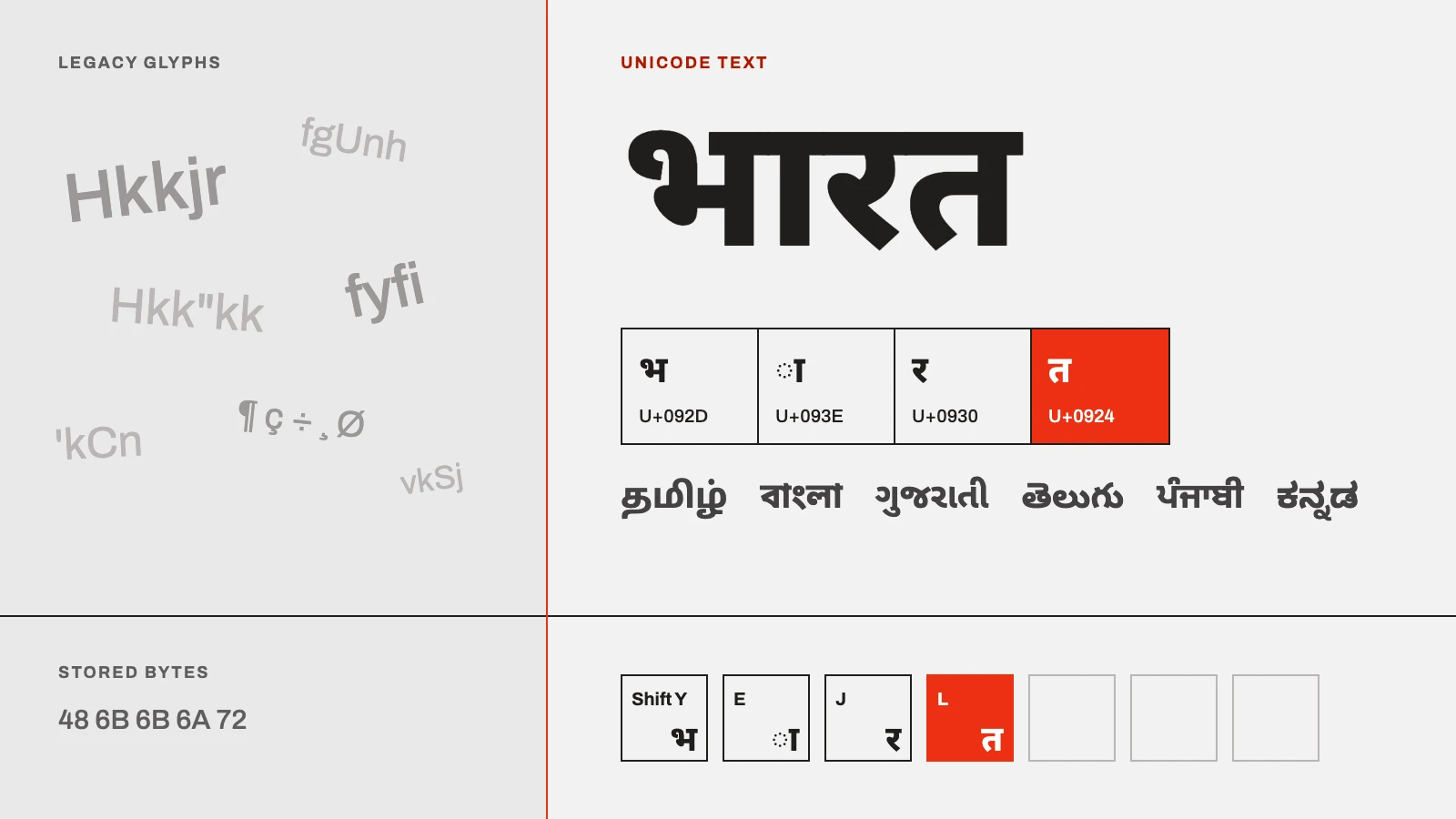
Type a sentence in Gujarati or Hindi on one computer, email it to a colleague, and watch it arrive as a wall of meaningless symbols. Copy a paragraph from an old government file into a web form and find that the website simply refuses to understand it. If you have worked with Indian-language text for any length of time (as a translator, a DTP operator, a publisher, or just someone who wants to write in their mother tongue) you have almost certainly hit this wall.
None of it is your fault, and none of it is random. It comes down to a handful of technologies working together, or failing to: how text is encoded, which fonts and keyboards are involved, and whether everything is speaking the same standard. This guide explains that machinery in plain language. By the end you'll understand why Indian-language text behaves the way it does, why the shift to Unicode matters more every year, and how to set up a workflow that will still work a decade from now. Wherever a practical step helps, we point to the right kind of tool (including TextSoft's own) but the goal here is understanding first.
Table of contents
What Indian language technology actually means
One country, many scripts
Unicode: the foundation
Legacy fonts
Legacy-to-Unicode conversion
Typing: layouts and input methods
Beyond typing: OCR, transliteration, speech, AI
Standards and policies
A practical workflow
Common mistakes
FAQ
Key takeaways
What Indian language technology actually means
Quick answer: Indian language technology is the collection of standards and software that let computers and phones handle India's scripts, encoding text as Unicode, typing it with keyboard layouts and input methods, displaying it with fonts, converting old files, and processing it with tools like OCR, transliteration and text-to-speech.
It helps to separate four layers that people routinely confuse:
Encoding, how a character is stored as a number the computer understands. This is Unicode's job.
Input, how you get characters in: a keyboard layout (like InScript) or an input method that converts your typing (like transliteration).
Rendering, how stored text is drawn on screen, which is where fonts come in.
Processing, everything you do with the text afterwards: search, spell-check, OCR, translation, speech.
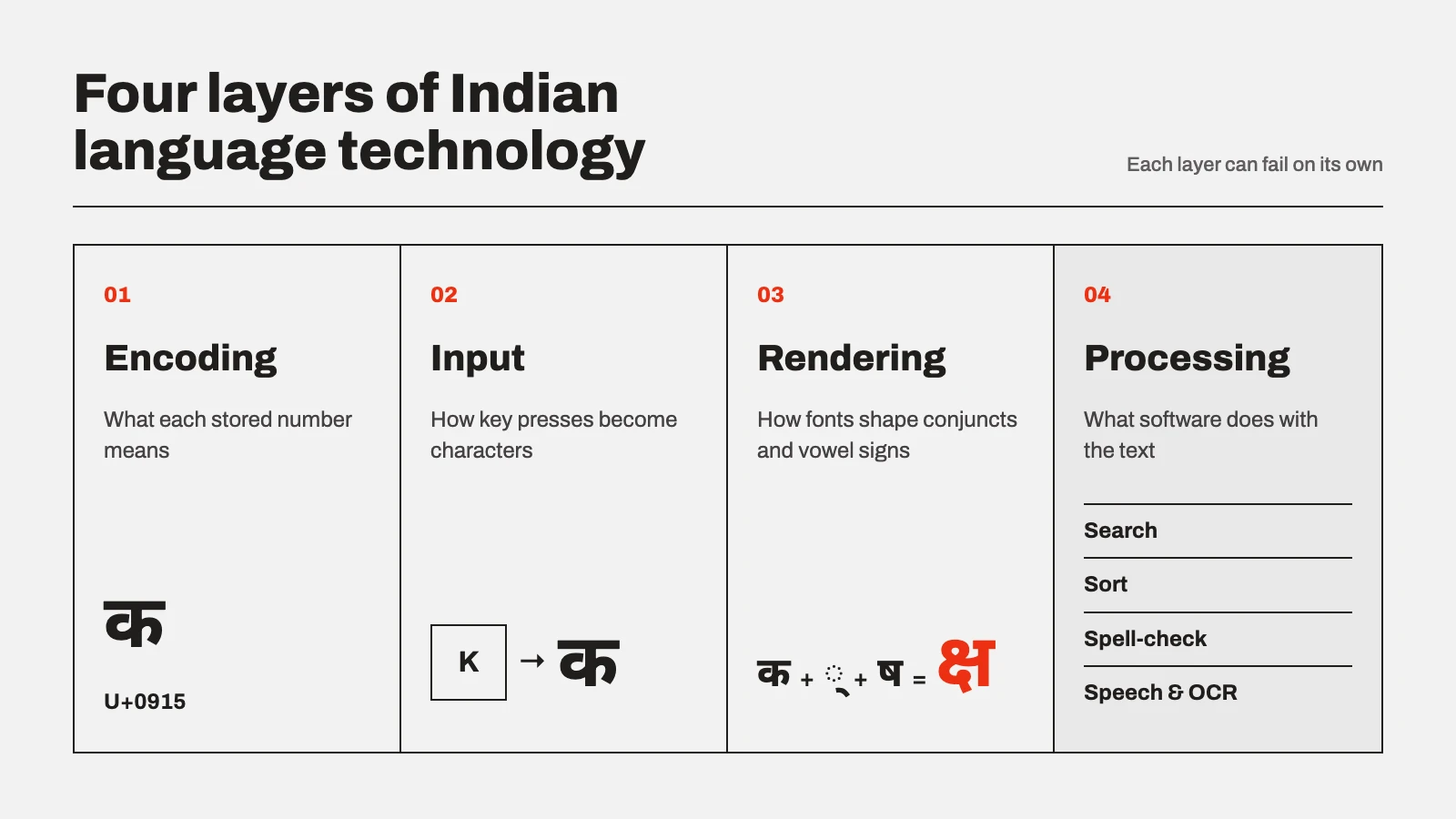
Most "why is my text broken?" problems are really a mismatch between the encoding layer and the font layer. Keep those two distinct in your head and the rest of this guide falls into place.
One country, many scripts: why this is genuinely hard
English gets by with 26 letters and a broadly one-key-one-letter keyboard. Indian scripts don't work that way. The Constitution's Eighth Schedule recognises 22 languages, written across roughly a dozen major scripts, Devanagari (Hindi, Marathi, and others), Gujarati, Bengali, Tamil, Telugu, Kannada, Malayalam, Gurmukhi (Punjabi), Odia and more.
These are abugida scripts: consonants carry an inherent vowel, vowels attach as signs above, below, before or after a consonant, and consonants combine into conjunct clusters. A single visual "letter" on screen can be several underlying characters that the software must reorder and reshape correctly, what engineers call complex-script rendering. That complexity is exactly why a naïve, English-style "one key = one glyph" approach caused two decades of chaos before Unicode, and why getting the encoding right matters so much.
Unicode: the foundation of modern Indian-language text
What Unicode is (and what it is not)
Unicode is a global standard that gives every character in every major writing system its own unique number, called a code point, independent of platform, application or font. The Devanagari letter "क", the Gujarati "ક" and the Tamil "க" each have a fixed identity that every compliant device agrees on. The standard is maintained by the Unicode Consortium, a non-profit whose standard underpins essentially all modern software; its most recent release, Unicode 18.0, arrived in September 2026, continuing an annual September cadence.
The single most useful thing to understand: Unicode is an encoding standard, not a font. Unicode decides which character your text contains. A font decides what that character looks like. Shruti, Nirmala UI, Mangal and Noto Sans Gujarati are all Unicode-compatible fonts, swap one for another and your text stays intact, because the underlying code points never change. This is precisely what legacy fonts cannot promise.
Indic blocks and the ISCII heritage
Indian scripts sit in dedicated Unicode ranges, Devanagari at U+0900–U+097F, Gujarati at U+0A80–U+0AFF, and so on. These blocks were derived from ISCII (the Indian Script Code for Information Interchange), the earlier national standard, and India's representation in Unicode is not accidental: the government's Technology Development for Indian Languages (TDIL) programme under MeitY is a voting member of the Unicode Consortium, and the encoding of all 22 constitutionally recognised languages is complete. In other words, the standard already covers your language; the work now is getting content and workflows onto it.
Legacy fonts: the technology still running India's back offices
How non-Unicode fonts actually work
Before Unicode was widely supported, typing Hindi or Gujarati meant using a legacy (non-Unicode) font. These fonts pull a clever trick: they map Indian glyphs onto the ASCII positions meant for English letters and symbols. Press the key that "is" the letter a, and a Devanagari shape appears, but the file underneath stores the code for a, not for any Indian character. The text only looks correct because a specific font is painting Indian shapes over English code points. Remove or change that font and the illusion collapses.
The legacy font families you'll still meet
Legacy fonts came in many incompatible families, often with dozens of numbered variants whose key mappings differ subtly. You will still encounter these in old documents, print workflows and government archives:
Font family | Typically used for | Status |
|---|---|---|
Kruti Dev, DevLys | Hindi / Devanagari (offices, typing tests) | Legacy, non-Unicode |
Shree Lipi, Shree-Dev | Multi-script DTP and publishing | Legacy, non-Unicode |
LMG, Harikrishna, Gopika, Saumil | Gujarati (print, legal, publishing) | Legacy, non-Unicode |
Akruti, ISM, GIST | Multi-language DTP suites | Legacy encodings |
Mangal, Shruti, Nirmala UI, Noto Sans (Indic) | Modern, cross-platform text | Unicode |
The pattern is clear: nearly everything in the "old" column shares the same fragile foundation, and everything in the modern row shares the same durable one.
Why legacy text breaks on the modern web
Because legacy files store English code points, the text is invisible to anything that reads real characters. That means:
Search fails. Google, and any site search, cannot index or match legacy-encoded content, so legacy pages are effectively invisible online.
Copy-paste and sharing break. Send the text without the exact font and the recipient sees gibberish.
Mobile and web display poorly, because phones and browsers expect Unicode.
Accessibility suffers. Screen readers, which convert text to speech for visually impaired users, cannot interpret glyph-mapped ASCII.
Modern systems reject it. A growing list of government and institutional portals accept only Unicode input.
This is why the migration isn't optional busywork. For a publisher it decides whether readers can find your content; for a government translator it decides whether a file is accepted at all.
Legacy-to-Unicode font conversion
What a converter really does
A font converter doesn't just change how text looks, it rewrites the underlying data. It reads the ASCII code points a legacy font relied on, applies a mapping specific to that font family, and outputs genuine Unicode characters, correctly reordered so that vowel signs and conjuncts sit where the script rules require. Done properly, the result is portable text that displays in any Unicode font, is searchable, copy-pastes cleanly, and works on the web and mobile.
Two cautions matter in practice. First, the mapping is font-specific: converting Kruti Dev is not the same operation as converting Shree Lipi or LMG, and using the wrong mapping produces garbled output. Second, complex conjuncts are where cheap converters fail, always proof-read converted text, especially half-letters and stacked clusters. Readers working regularly with legacy Indian-language files may find TextSoft's font-conversion and Indian-language typing tools relevant here; whichever tool you choose, judge it on how faithfully it handles conjuncts and how many font families it maps.
When legacy fonts are still the right choice
Unicode is the default for anything digital, shareable or web-bound. But legacy fonts aren't quite dead. Some established print and design workflows are still built around specific legacy typefaces for their exact visual style, and some older machines or offline systems remain on legacy setups. The pragmatic rule: produce and store in Unicode; reach for a legacy font only when a specific print or design requirement demands that particular face, and keep a Unicode master copy regardless.
Typing in Indian languages: layouts and input methods
Getting characters in is a separate question from how they're stored. There are three broad approaches, and the right one depends on who's typing.
InScript, Remington and phonetic input compared
Method | How it works | Best for | Trade-off |
|---|---|---|---|
InScript | The standard layout notified for Indian scripts (developed by C-DAC), bundled with Windows, macOS, Linux and Android. Keys map to phonetic positions consistent across Indian scripts. | Professional, high-volume typists; anyone wanting a durable, standard skill | Learning curve; you must memorise the layout |
Remington | Mimics the old mechanical Hindi typewriter layout. | Typists trained on typewriters; some government typing tests still specify it | Idiosyncratic; not intuitive for new users |
Phonetic / transliteration | Type the sound in Roman letters ("namaste") and software converts it to the script. | Casual and occasional users; fast onboarding | Depends on the converter's accuracy; less precise for formal work |
For an everyday regional-language user, phonetic input is usually the gentlest on-ramp. For a professional who types all day, InScript pays back its learning curve because it's standardised and works the same across systems. Many typing tools (TextSoft's included) support more than one of these so a team can standardise without forcing everyone onto the same layout.
Beyond typing: OCR, transliteration, speech and AI
Typing is only the entry point. A modern Indian-language workflow increasingly leans on:
OCR (optical character recognition), extracting editable, searchable text from scanned documents, images and PDFs. This is how decades of printed and archival material becomes digital and Unicode-native.
Transliteration, converting between scripts, or between Roman and Indic script, at scale.
Text-to-speech and speech-to-text, powering accessibility and hands-free input, both of which depend on clean Unicode text underneath.
NLP and AI, translation, summarisation and language models for Indian languages, an area advancing quickly. Every one of these depends on properly encoded input; feed an AI system legacy-encoded gibberish and it learns nothing useful. Good encoding hygiene is the quiet prerequisite for all of it.
The standards and policies worth knowing
You don't need to be a standards expert, but a few facts explain the direction of travel:
Unicode is the destination. Indian government portals and e-governance platforms increasingly accept only Unicode, and TDIL/MeitY's active role in the Consortium signals that this is settled policy, not a passing preference.
Mobile support is mandated. Under IS 16333 (Part 3), effective from 1 July 2017, phones sold in India must support reading text in all Indian languages and typing in English, Hindi and a regional language of the user's choice, which is why your phone can already handle Indic text out of the box.
The standard keeps growing. With Unicode 18.0 (September 2026), coverage of Indic and historic scripts continues to expand, reinforcing Unicode as the safe long-term choice.
The takeaway for any organisation: building new content in Unicode isn't just best practice, it's alignment with where Indian digital infrastructure has already gone.
A practical workflow: choosing your setup
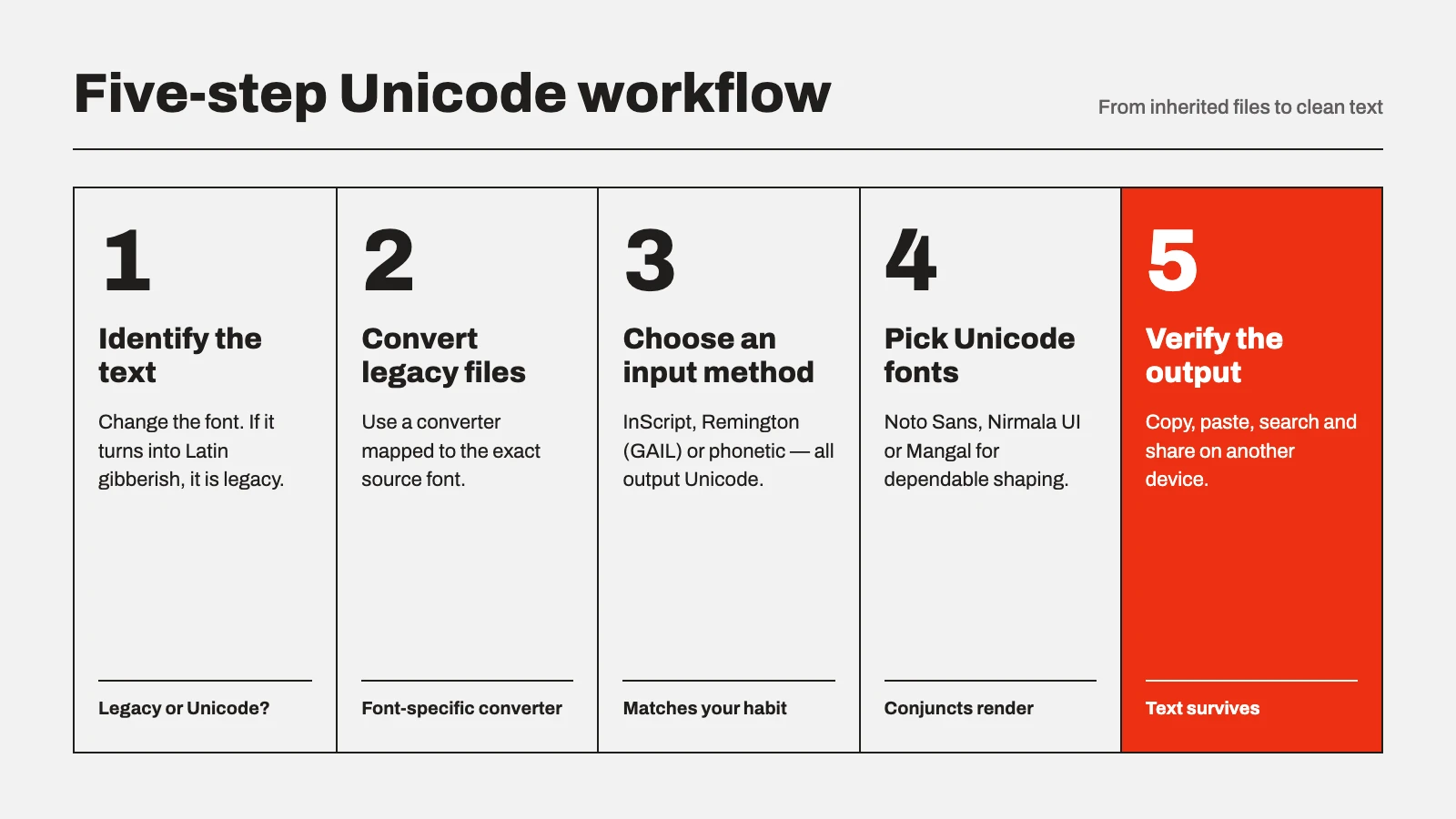
Use this quick decision checklist:
Is the output digital, web-bound or shareable? → Work in Unicode. (Almost always yes.)
Are you inheriting old files in a legacy font? → Identify the exact font family first, then convert to Unicode with a converter that maps that family, and proof-read conjuncts.
Who is typing? → Casual users: phonetic/transliteration. Professionals/high volume: InScript. Typewriter-trained staff or specific government tests: Remington.
Do you have scanned or printed source material? → Use OCR to bring it into Unicode rather than retyping.
Do you have a genuine print/design reason for a specific legacy face? → Fine, but keep a Unicode master copy for search, web and archiving.
Follow those five steps and you'll rarely hit the "broken text" wall again.
Common mistakes to avoid
Treating Unicode as a font. It's an encoding. Changing fonts within Unicode is safe; mixing legacy and Unicode is what breaks things.
Using the wrong converter mapping. A Kruti Dev converter won't correctly convert Shree Lipi or LMG. Match the tool to the font.
Not proof-reading conjuncts after conversion. This is where errors hide.
Publishing legacy-encoded text to the web and wondering why it never ranks or displays. Convert first.
Retyping scanned documents by hand when OCR could extract them into Unicode in a fraction of the time.
Frequently asked questions
What is the difference between Unicode and a legacy font? Unicode is a universal encoding standard that gives each character a fixed identity, so text stays intact across devices and fonts. A legacy (non-Unicode) font maps Indian glyphs onto English/ASCII code points, so the text only displays correctly when that exact font is installed and breaks everywhere else.
Why does my Hindi or Gujarati text turn into random symbols on another device? Almost always because it was created in a legacy font that isn't installed on the second device, or because legacy-encoded text was pasted somewhere that expects Unicode. Converting the text to Unicode fixes this permanently.
Is Unicode a font I need to download? No. Unicode is an encoding standard. You do need a Unicode-compatible font (such as Shruti, Nirmala UI, Mangal or a Noto Indic font) to display the text, but these ship with modern operating systems.
How do I convert an old Kruti Dev, Shree Lipi or LMG file to Unicode? Use a font converter that supports that specific legacy family. Paste or load the legacy text, select the correct source font, convert to Unicode, and proof-read the conjuncts. Keep the Unicode output as your master copy.
Which typing method should a beginner use? Phonetic (transliteration) input is the easiest start, you type the sound in Roman letters and it converts to the script. Professionals who type all day benefit more from learning the standardised InScript layout.
Will legacy fonts stop working entirely? They still render where the font is installed, and some print/design workflows keep using them. But for anything digital, searchable or shared, Unicode is the standard, and public systems increasingly require it.
Can search engines read my regional-language content? Only if it's in Unicode. Legacy-encoded text is invisible to search engines, which is a major reason publishers and content creators should convert.
Key takeaways
Indian language technology has four layers (encoding, input, rendering, processing) and most problems are an encoding-vs-font mismatch.
Unicode is the foundation. It's a standard, not a font, and it's where Indian digital infrastructure has already committed.
Legacy fonts are the recurring pain point. They store English code points, so legacy text breaks search, sharing, mobile display and accessibility.
Conversion is the bridge, but it must be font-specific and proof-read.
Choose typing methods and tools by who's typing and where the text is going, and keep a Unicode master copy of everything.
Published 25 September 2026. This guide reflects the standards landscape as of that date, including Unicode 18.0.
Type in every script, the right way
TextSoft brings system-wide typing in 13 Indian scripts and accurate font conversion to Windows.
Get TextSoft