Unicode vs Legacy Fonts: What's the Difference and Which Should You Use?
You type a letter in Hindi, email it, and the recipient sees fgUnh where you wrote हिन्दी. Or you copy a paragraph from an old Gujarati file into…
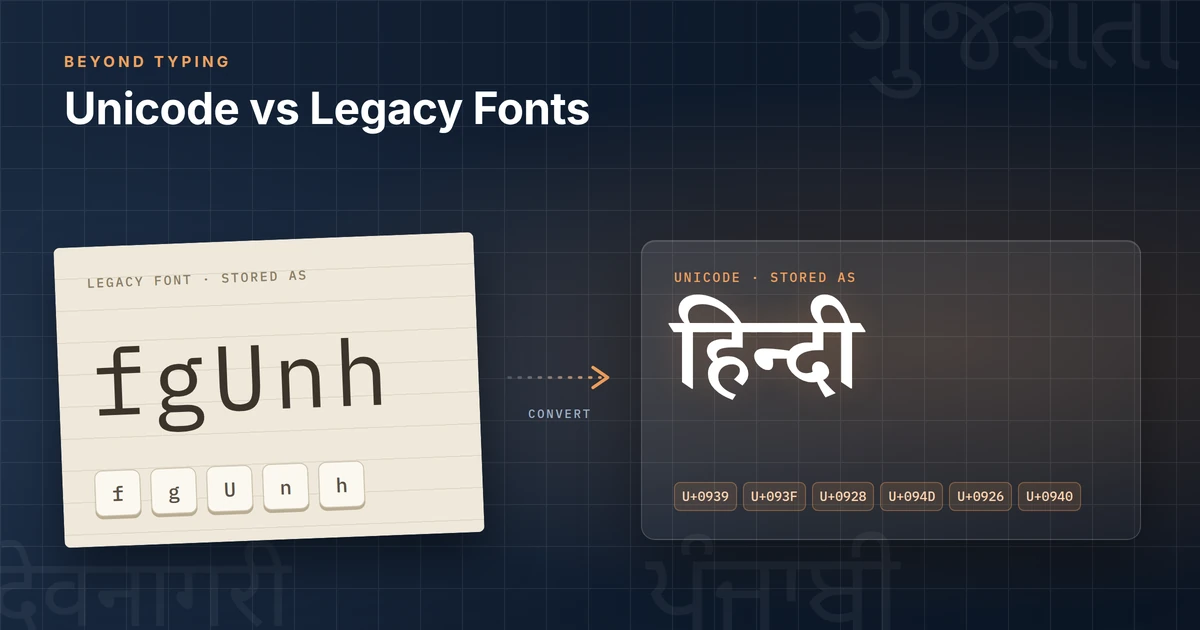
You type a letter in Hindi, email it, and the recipient sees fgUnh where you wrote हिन्दी. Or you copy a paragraph from an old Gujarati file into a web form and get a row of symbols. Neither the document nor the computer is broken. The text was stored in a way that only one particular font understands.
That is the heart of the difference between Unicode and legacy fonts, and once it clicks, most of the practical decisions follow.
Quick answer
Unicode is a universal standard that gives every character, in every script, its own number. Text stored in Unicode means the same thing on any modern device, whatever font displays it. A legacy font (such as Kruti Dev for Hindi) stores Indian-language text as ordinary Latin keyboard codes and relies on that one font to draw them as Indian letters. Without the font, the text turns into gibberish, and it cannot be reliably searched, sorted or shared. Use Unicode for all new work. Keep legacy fonts only where a specific system or requirement still demands them, and convert archives you need to reuse.
First, untangle the terms
Most confusion about this topic comes from treating several different things as one. It is worth separating them before going further.
Character encoding is the rulebook that turns stored numbers into characters. When a file says "character 2361", the encoding decides which letter that is.
Unicode is one encoding standard (strictly, a character set with encoding forms such as UTF-8) that covers virtually every modern script, including all the scripts used for India's official languages.
A font is a set of shapes, called glyphs, used to draw characters. A font should not change what the text is; it only changes how it looks.
A keyboard layout decides which character you get when you press a key. InScript, phonetic and typewriter-style ("Remington") layouts are layouts, not encodings. You can type Unicode Hindi with a Remington-style layout if your typing software supports it.
Typing software (an input method) sits between the keyboard and the document, applying a layout and producing characters.
Rendering is the job of the operating system or app: taking stored characters and arranging the correct glyphs on screen, including conjuncts and vowel signs.
Conversion changes the stored characters themselves, from one encoding to another.
The key idea: in a healthy system, encoding decides meaning, fonts decide appearance. Legacy Indian fonts blur those two roles, and that is where the trouble starts.
What is Unicode?
The Unicode Consortium describes Unicode as providing "a unique number for every character, no matter what the platform, no matter what the program, no matter what the language." That number is called a code point. The Devanagari letter ह is always U+0939. The Gujarati letter હ is always U+0AB9. The current release, Unicode 18.0 (September 2026), defines 172,808 characters.
Two design choices matter for Indian scripts.
First, Unicode encodes characters, not glyphs. The standard says plainly that glyph shapes "are the responsibility of individual font vendors" and are not part of Unicode (Core Specification, §2.2). So a conjunct such as न्द is not stored as one special shape. It is stored as न + virama (्) + द, and the rendering engine picks the correct joined shape from the font (Unicode Indic FAQ).
Second, Unicode stores text in logical order, roughly the order you pronounce it. The vowel sign ि is drawn to the left of its consonant, but it is stored after it (Core Specification, §12.1). The software handles the visual reordering.
Because meaning lives in the code points, any Unicode font that supports the script can display the text, and search engines, spell-checkers, screen readers and databases can all understand it. Unicode fonts you may already use include Mangal and Nirmala UI on Windows and the Noto family.
What is a legacy font?
A legacy font, in the Indian-language sense, is a font built before Unicode support for Indian scripts was widespread, which puts Indian-script shapes in the slots normally used for Latin letters, digits and punctuation.
Kruti Dev is the best-known Hindi example. As its Wikipedia entry summarises, it "maps Devanagari glyphs onto ASCII character positions." When you type in Kruti Dev, the file actually stores ordinary English keyboard characters. The font simply draws a Devanagari shape wherever, say, the letter g appears. Other widely encountered legacy families include Chanakya, DevLys and Shree-Lipi-era fonts for Devanagari, and similar font-specific systems for Gujarati, Gurmukhi, Tamil and other scripts. [VERIFY: trim this list to fonts TextSoft's converter actually supports, if you want the examples to match the product.]
It would be wrong to call these "bad fonts". Many are well designed and were the only practical way to publish in Indian languages for years. The limitation is structural: the meaning of the text depends on the font, and there is no single shared standard. A 2015 survey of Indian font-conversion systems noted that these fonts "are not based on a single standard mapping" between codes and characters, so the same byte can mean different letters in different fonts (Buttar & Kaur, IJCI).
How legacy fonts actually store text
Take the word हिन्दी ("Hindi") and look at what each system stores.
In Unicode, the file stores six characters, in spoken order:
Stored | Code point | Name |
|---|---|---|
ह | U+0939 | Devanagari letter HA |
ि | U+093F | Devanagari vowel sign I |
न | U+0928 | Devanagari letter NA |
् | U+094D | Devanagari sign virama |
द | U+0926 | Devanagari letter DA |
ी | U+0940 | Devanagari vowel sign II |
Any Devanagari-capable Unicode font will show हिन्दी. The code points were checked against the Unicode Character Database.
In Kruti Dev 010, the same word is typically stored as the five Latin characters fgUnh. [VERIFY before publishing: type or convert this string in a Kruti Dev 010 installation.] With the Kruti Dev font applied, those letters are drawn as हिन्दी. Without it, you see fgUnh.
Notice three things:
The stored text is English letters. A search for "हिन्दी" will never match
fgUnh.The order is visual, not spoken. The
f(drawn as ि) comes before theg(drawn as ह), because that is where the vowel sign appears on the page. Unicode stores it after.Shapes, not letters.
Uis a half-न shape. Unicode has no "half-na" character; it stores न plus virama.
So a legacy file is closer to a picture drawn with keyboard characters than to text a computer understands.
Unicode vs legacy fonts: comparison table
Criteria | Unicode | Legacy font system |
|---|---|---|
Character representation | Each script character has its own standard code point | Indian-script shapes placed in Latin/ASCII slots; meaning depends on the font |
Portability | Readable with any font that supports the script | Readable only where the exact same font is installed |
Searchability | Searchable in the native script | Search works only on the underlying Latin codes, font-specific and unreliable |
Copy/paste | Keeps meaning across apps | Pasted text often shows as Latin gibberish |
Cross-device use | Supported by modern Windows, macOS, Linux, Android and iOS | Often unavailable on phones and many web platforms |
Web use | Native to HTML, URLs and modern web standards | Needs the font to be embedded and still isn't machine-readable |
Long-term preservation | Open, versioned international standard | Depends on a font file and its mapping surviving |
Interoperability | Works with spell-checkers, screen readers, translation and databases | Most language tools cannot interpret it |
Conversion needs | None for modern workflows | Needs font-specific conversion to reach Unicode |
Fit for modern workflows | Default choice | Limited to specific legacy systems and requirements |
Why legacy-font text breaks
Everything in the table flows from one fact: the letters are defined by the font, not by the file.
The font is missing. Send a Kruti Dev document to someone without Kruti Dev and their computer falls back to a normal font, which draws fgUnh as exactly that.
The text leaves its application. Copying into an email, a web form, WhatsApp or a content management system usually strips the font, leaving only the Latin codes.
Machines read the codes. Search engines, the Find box, sorting, spell-check, text-to-speech and translation all see Latin letters. For a screen-reader user, a legacy-font document is unreadable.
Fonts disagree with each other. Because each legacy family made its own mapping, switching a paragraph from one legacy font to another can change the words, not just the look.
Unicode avoids all four problems for the same reason: the meaning travels with the text.
Why legacy fonts are still around in India
Legacy fonts persist for practical reasons, not ignorance.
Archives. Offices, courts, publishers, schools and newspapers produced years of documents before Unicode Indian-script support was common. That content still gets reused.
Typing habits. Many professional typists learned on typewriter-style layouts and legacy fonts, and speed matters. (Note that the layout can be kept while switching the encoding to Unicode, if the typing software supports that layout.)
Requirements. Some recruitment and typing tests have historically specified fonts such as Kruti Dev. Candidates practise what the exam requires.
Print and DTP workflows. Older design and prepress setups, fonts and templates were built around legacy encodings.
At the same time, official standards have moved to Unicode. A 2023 C-DAC presentation on Government of India e-governance standards names Unicode as the basis for storing and exchanging text and specifies "UNICODE compliant" OpenType fonts, alongside the BIS Enhanced InScript keyboard standard IS 16350:2016 for 11 scripts (egovstandards.gov.in).
Which should you use?
For anything new, use Unicode. Websites, email, social media, government portals, databases, e-books, documents you will share, and anything that must be searchable or accessible. There is no modern workflow where a legacy font gives you something Unicode cannot.
For existing legacy documents, convert the ones you will reuse. If a file will be edited, published online, searched or shared outside your office, converting it saves repeated trouble. Files that are only ever printed from the same machine can wait.
Legacy fonts are still reasonable when:
an exam, employer or client explicitly requires a named legacy font;
you are editing a document that must go back into a legacy-only system (for example an old DTP template) without changes;
you are preparing typing practice for a legacy-font test.
In those cases, treat legacy as an output format for a specific destination and keep your master copy in Unicode where possible.
What happens during legacy-to-Unicode conversion
Conversion is more than find-and-replace. A converter has to:
Know the source font.
fmeans ि in Kruti Dev but may mean something else in another legacy font. The converter needs the correct mapping table.Map shapes to characters. One legacy glyph can become several Unicode characters (a half-form becomes consonant + virama) and several glyphs can become one character.
Reorder. Visual-order pieces, such as ि typed before its consonant, or the reph (the र् mark written above a letter) placed after it, are moved into Unicode's logical order.
Leave other text alone. English words, numbers and punctuation in the same document should not be converted. In a mixed file, this depends on the font being applied only to the Indian-language runs.
Change the font. The output is shown in a Unicode font such as Mangal, Nirmala UI or Noto.
The hard cases are rare conjuncts, custom glyphs that a publisher added to its own font, and documents where the legacy font was applied inconsistently. Good conversion tools handle the common patterns well; checking the output is still part of the job.
Things to check before converting an archive
Which fonts are really in use? List every legacy font across the archive, including variants (Kruti Dev 010 and other Kruti Dev versions are not always identical).
What formats are the files? Word, Excel, plain text, PDF and scanned images need different handling. A scanned image contains no text at all and needs OCR, not font conversion.
Is the text mixed? Find documents that combine English and Indian-language text, or several legacy fonts.
Run a sample. Convert a representative batch and have a fluent reader proof it for conjuncts, reph placement, nukta and punctuation.
Keep the originals. Never overwrite source files. Store converted copies separately with a clear naming rule.
Check the destination. Make sure the target system (CMS, database, DMS) stores UTF-8 and displays the script correctly.
Plan the layout pass. Unicode fonts have different widths, so page breaks and tables may shift.
Common mistakes
Changing the font instead of converting. Selecting Kruti Dev text and choosing Mangal from the font menu does not convert it; you get Latin gibberish in a Unicode font.
Confusing layout with encoding. "I type Remington, so I must use Kruti Dev" is not true when typing software offers a Remington-style layout that outputs Unicode.
Converting with the wrong source mapping. This produces text that looks almost right and is quietly wrong.
Treating scanned PDFs as text. They need OCR first.
Skipping proofreading. Even a small error rate across thousands of pages is a lot of errors.
Converting back and forth. Each round trip is another chance for errors. Keep a Unicode master.
Where TextSoft fits in
For people who already have documents in legacy fonts, a conversion tool can move that content into Unicode without retyping every page. TextSoft provides legacy-to-Unicode conversion for supported fonts and formats, alongside TextSoft's Indian-language typing software.
Frequently asked questions
What is the difference between Unicode and legacy fonts? Unicode stores each character as a standard number that every modern system understands. A legacy font stores Latin keyboard codes and draws them as Indian-script shapes, so the text only makes sense with that exact font.
Is Kruti Dev a Unicode font? No. Kruti Dev is a legacy font that places Devanagari shapes on Latin/ASCII character positions. Mangal, Nirmala UI and Noto Sans Devanagari are examples of Unicode fonts.
What happens when a legacy font is missing? The computer uses another font to draw the stored codes, so you see Latin letters and symbols (for example fgUnh) instead of the Indian-language text.
Can legacy-font text be searched? Not in a useful way. Search sees the underlying Latin codes, so a search in Hindi or Gujarati script will not find it. Converting to Unicode makes it searchable.
Can legacy documents be converted to Unicode? Yes, with a converter that knows the source font's mapping. Results are generally good for common text; proofread a sample, especially conjuncts and rare characters. Scanned images need OCR instead.
What is Unicode typing? Typing that produces Unicode characters directly, using a layout such as InScript, phonetic or a typewriter-style layout through typing software. What you type is portable from the moment it is saved.
Do I have to learn a new keyboard layout to switch to Unicode? Not necessarily. The layout and the encoding are separate. If your typing software offers the layout you already know with Unicode output, you can keep your habits.
Type in every script, the right way
TextSoft brings system-wide typing in 13 Indian scripts and accurate font conversion to Windows.
Get TextSoft